I hate WordPress
date();
is NOT correct!!!
date_i18n();
(This only applies if you’re outside of UTC. What’s that, like 99% of the world?)
There are a couple ways to extract map tiles from the various archives - the most popular being MBTiles and PMTiles these days. The best way, though, is using tile-join from felt/tippecanoe:
tile-join -e dir/ input.pmtiles
This will output all tiles as a hierarchy in dir - dir/{z}/{x}/{y}.{ext}. When working with vector tiles, you might need to specify -pC (no tile compression). By default, tiles are compressed in the archive, but if you need the raw tiles in a directory, specifying this option will output the raw, uncompressed files.
date();
is NOT correct!!!
date_i18n();
(This only applies if you’re outside of UTC. What’s that, like 99% of the world?)
The origins of Twitter.
In related news, if you haven’t heard about it yet: Twitter API v1.1
I’m sure you have heard of App.net by now. The paid, non-advertisement-supported “live social stream” (read: Twitter). They set a $500,000 goal, and raised more than $800,000 - a clear indicator that some level of demand is there for such a service.
There are two levels of membership, the $50 “User” level and the $100 “Developer” level. A developer account will give you the necessary API keys to build apps that connect to App.net. I was very interested in how these prices were chosen, and thankfully App.net published their logic (“How did you come up with the pricing tiers?” in the FAQ).
There’s no denying that PHP is not the optimal language. But at least code in good PHP. Here’s my pet peeve for the day:
Relative paths in include(_once)? or require(_once)? statements.
// WRONG
require_once("./include_me.php");
// RIGHT
require_once(dirname(__FILE__) . "/include_me.php");
Why? Basically, performance. PHP doesn’t look through all its search paths for absolute paths, saving those precious system calls. This effect is compounded when you’re using the APC cache with apc.stat = 0 (it won’t even cache files that are referred to with a relative path)
Basically, do not use text-rendering: optimizeLegibility; with Japanese. At least, not yet. Why not? Here are some examples.
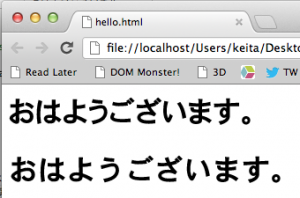
The top line has text-rendering: optimizeLegibility; applied, and the bottom line use the browser defaults. As you can probably tell, optimizeLegibility has indeed optimized the legibility, and the type looks much nicer. However, there is a fatal bug in rendering Japanese characters with optimizeLegibility: It seems that the actual optimization is taking place after the length of the line is calculated. As you can imagine, this is a problem. Here’s a screenshot with an underline applied:
This is what text (more or less) looks like in Windows! Just do:
```css \* { -webkit-font-smoothing: none; } ```
To enable Windows Emulation mode. Great stuff.
There’s a few resources about -webkit-font-smoothing in English, but I was wondering what it would look like in Japanese. Here we go.
おはようございます。僕の名前は敬太郎です。東京にうまれ、アメリカのメイン州育ちです。大学は国際基督教大学、3年間の後で退学しました。今は、東京武蔵野市の吉祥寺に住んでて、Flagship LLCでエンジニア・プログラマーとして働いています。よろしくお願いします。
A few days ago, I posted a small JavaScript snippet.
Retina, Please! is that JavaScript snippet on steroids. It is a combination of JavaScript and PHP to allow your Retina users to only download Retina images, while non-Retina users only download the standard-resolution version.
Check it out: https://github.com/keichan34/KKRetinaPlease WordPress Theme Writers: just require it in your functions.php. I may package it into a real plugin later on.
I’ve tested it with CakePHP as well.
Today, we just released the Varnish-ed site I posted about a few days ago. A few things to be careful about in your Varnish deployment (that I had originally overlooked):
Been wondering how to simply retina-ize your website? Put this at the end of your site:
$(function() {
  try {
  if (window.matchMedia('(-webkit-min-device-pixel-ratio: 2), (min-device-pixel-ratio: 2)').matches) {
    $('.autoRetina').each(function(i, e) {
      var orig_src = $(e).attr('src');
      var new_src = orig_src.replace(/^(.*?).(png|jpe?g|gif)$/i, '$1@2x.$2');
      $(e).attr('src', new_src);
    });
  }
  } catch (e) {}
});
If you’re on a Retina-equipped device, your images with the autoRetina class will automatically be replaced with their Retina counterparts. If you’re familiar with iOS development, you’ll feel right at home. If you have no clue what I’m talking about, just append @2x at the end of the filename (before the extension).