There are a couple ways to extract map tiles from the various archives - the most popular being MBTiles and PMTiles these days. The best way, though, is using tile-join from felt/tippecanoe:
tile-join -e dir/ input.pmtiles
This will output all tiles as a hierarchy in dir - dir/{z}/{x}/{y}.{ext}. When working with vector tiles, you might need to specify -pC (no tile compression). By default, tiles are compressed in the archive, but if you need the raw tiles in a directory, specifying this option will output the raw, uncompressed files.
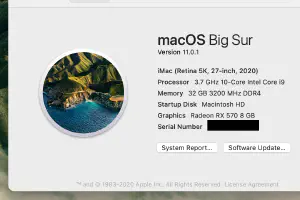
Like you, I’ve been finding myself working from home more often than not. These days, I probably go to an office once a month. I have a 16 inch MacBook Pro, but using it in clamshell mode, all the time, connected to a 4K monitor was… not ideal. It would often thermally throttle way down (often, it would be really sluggish – I wondered, how fast is this running? 800MHz. 90C. Fans at 100%.)
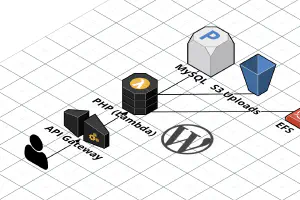
I previously wrote a post about running WordPress on AWS Lambda, but it was before EFS support was announced (EFS is a managed network file system AWS provides). Being able to use EFS completely changes the way WordPress works in Lambda (for the better!), so I felt it warranted a new blog post.
In addition, this time I’m using Terraform instead of SAM. This matches the existing infrastructure-as-code setup I use when I deploy infrastructure for clients. Here’s the Terraform module ( source code).
During the COVID-19 pandemic, schools and daycares have been closed, so my family decided to use this as an opportunity to make some habits to make sure we can get through this period with minimal interruptions to life and work. Here are some habits that have worked so well for us that we’re planning on keeping them, even after the kids go back to school / daycare.
Keeping a schedule
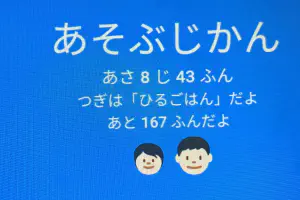
We use a schedule to make sure the time we eat, sleep, and do activities are at regular times every day. At first, I thought this would be a good tool to let the kids know when we were working and when we could play together, but it’s proven to be a useful tool to both adults and children. I’ve written a blog post in Japanese about this as well.
When I set up Rails on AWS, I usually use the following pattern:
(CloudFront) → ALB → Puma
I was wondering: Is it always necessary to put nginx between the ALB and Puma server?
My theory behind not using nginx is that because it has its own queue (while the Classic Load Balancer had a very limited “surge queue”, the ALB does not have such a queue), it will help in getting responses back to the user (trading for increased latency) while hindering metrics used for autoscaling and choosing what backend to route the request to (such as Rejected Connection Count).
私は料理が好きです。特にパンを焼くのが好きで、この間初めて Cookpad に公開したのは フォカッチャのレシピ でした。フリーランスでシステム開発をしているエンジニアで、ゼロスタートから運用まで持っていくことを得意分野としています。この2つの要素を組み合わせて新しい何かを作るのが趣味ですが、そのことを今まであまりブログに書いたことはありませんでした。今回のアプリを作ったことで、「アプリは家庭料理みたいでもいい( An app can be a home-cooked meal)」という記事のことを思い出して、同様の考え方を共有したいと思いました。
While working on a Ruby project, I often find myself referring to the code of various libraries when it’s easier than looking up the documentation. For this, I used to use code (bundle show GEM_NAME), but recently I’ve been getting this warning:
[DEPRECATED] use `bundle info $GEM_NAME` instead of `bundle show $GEM_NAME`
Okay, that’s fine, but bundle info returns a bunch of stuff that would confuse VS Code:
> bundle info devise
  * devise (4.7.1)
	Summary: Flexible authentication solution for Rails with Warden
	Homepage: https://github.com/plataformatec/devise
	Path: /Users/keita/.asdf/installs/ruby/2.7.0/lib/ruby/gems/2.7.0/gems/devise-4.7.1
Luckily there’s bundle info $GEM_NAME --path. code (bundle info devise --path) is kind of long to type out every time, though, so I decided to make an alias.
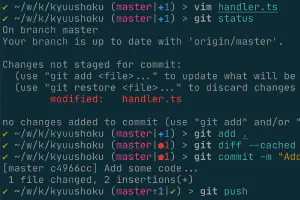
I’ve been using Git at work for around 10 years now. I started using Git with a GUI ( Tower -- back when I was eligible for the student discount!), but now I use the CLI for everything except complicated diffs and merges, where I use Kaleidoscope.
A question I get asked by my coworkers often is: “how in the world do you manage using Git without a GUI?”. This blog post is supposed to answer this question.
I’m a big fan of AWS ECS Fargate. I’ve written in the past about managing ECS clusters, and with Fargate – all of that work disappears and is managed by AWS instead. I like to refer to this as quasi-serverless. Sorta-serverless? Almost-serverless? I’m open to better suggestions. 😂
There are a few limitations of running in Fargate, and this blog post will focus on working around one limitation: there’s easy way to get an interactive command line shell within a running Fargate container.