Serverless Meetup Tokyo #13 に参加してみました
Serverless Meetup Tokyo 第13回 に参加してみました。
会場は Speee Lounge
ServerlessDays Tokyo 2019
というイベントの啓発(参加者、登壇者)ありました。私も参加しようと思っています。登壇は、、検討します(笑)
There are a couple ways to extract map tiles from the various archives - the most popular being MBTiles and PMTiles these days. The best way, though, is using tile-join from felt/tippecanoe:
tile-join -e dir/ input.pmtiles
This will output all tiles as a hierarchy in dir - dir/{z}/{x}/{y}.{ext}. When working with vector tiles, you might need to specify -pC (no tile compression). By default, tiles are compressed in the archive, but if you need the raw tiles in a directory, specifying this option will output the raw, uncompressed files.
Serverless Meetup Tokyo 第13回 に参加してみました。
会場は Speee Lounge
というイベントの啓発(参加者、登壇者)ありました。私も参加しようと思っています。登壇は、、検討します(笑)
I’ve written about how to host a single page application (SPA) on AWS using CloudFront and S3 before, using the CloudFront “rewrite not found errors as a 200 response with index.html” trick.
Recently, working on a few serverless apps, I’ve realized that this trick, while quick, isn’t perfect. The specific case where it broke down was when the API is configured as a behavior on CloudFront (I usually scope the API to /api on the same domain as the frontend, so CORS and OPTIONS requests aren’t necessary). If the API returned a 404 Not Found response, CloudFront would rewrite it to 200 OK index.html, and the front-end application would get confused. Unfortunately, CloudFront doesn’t support customized error responses per behavior, so the only way to fix this was to use Lambda@Edge instead.
Update 2020/07/29: AWS recently announced EFS support for Lambda, which makes running WordPress in Lambda easier, with fewer limitations. Here’s the new article about how to run WordPress in Lambda using EFS.
There are a few ways to run WordPress “serverless” on AWS. I’m going to talk about running WordPress on Lambda for this article. If you’re interested in how you can run WordPress serverless-ly on Fargate, I’m working on a post about that too.
Throughout these past 4 years since AWS ECS became generally available, I’ve had the opportunity to manage 4 major ECS cluster deployments.
Across these deployments, I’ve built up knowledge and tools to help manage them, make them safer, more reliable, and cheaper to run. This article has a bunch of tips and tricks I’ve learned along the way.
Note that most of these tips are rendered useless if you use Fargate! I usually use Fargate these days, but there are still valid reasons for managing your own cluster.
The bots should announce, “I’m not a person, or if I am, I’m not allowed to act like one.”
Or, if there’s no room or time for that sentence, perhaps a simple bot at the top of the conversation. That way, we can save our human emotions for the humans who will appreciate them.
-- Truth in bots | Seth’s Blog
“If you can’t tell the difference, does it matter?”
Update: Target tracking scaling is now available for ECS services.
I’ve been working on setting up autoscaling settings for ECS services recently, and here are a couple notes from managing auto-scaling for ECS services using Terraform.
min_capacity and max_capacity must both be set.schedule uses the CloudWatch schedule expression syntax, with the addition of the at(...) expression.
Terraform will perform the following actions:

  + aws_appautoscaling_scheduled_action.green_evening
      id:
      arn:
      name:                                  "ecs"
      resource_id:                           "service/default-production/green"
      scalable_dimension:                    "ecs:service:DesiredCount"
      scalable_target_action.#:              "1"
      scalable_target_action.0.max_capacity: "20"
      scalable_target_action.0.min_capacity: "2"
      schedule:                              "cron(0 15 * * ? *)"
      service_namespace:                     "ecs"

  + aws_appautoscaling_scheduled_action.wapi_green_morning
      id:
      arn:
      name:                                  "ecs"
      resource_id:                           "service/default-production/green"
      scalable_dimension:                    "ecs:service:DesiredCount"
      scalable_target_action.#:              "1"
      scalable_target_action.0.max_capacity: "20"
      scalable_target_action.0.min_capacity: "3"
      schedule:                              "cron(0 23 * * ? *)"
      service_namespace:                     "ecs"
This fails with:
この記事は ECS ChatOps with CodePipeline and Slack の日本語訳です
現在、Rails アプリケーションを ECS に移行する作業を進めています。現在のシステムでは Capistrano でデプロイを行っていますが、そろそろ限界が見えてきました。
I’m currently working on migrating a Rails application to ECS at work. The current system uses a heavily customized Capistrano setup that’s showing its signs, especially when deploying to more than 10 instances at once.
While patiently waiting for EKS, I decided to use ECS over manage my own Kubernetes cluster on AWS using something like kops. I was initially planning on using Lambda to create the required task definitions and update ECS services, but native CodePipeline deploy support for ECS was announced right before I started planning the project, which greatly simplified the deploy step.
A few years ago when I was doing client work, we would regularly host clients’ sites and apps for them. During this time, I was responsible for both development and keeping them up and running as much as possible. Most of the money being in new development, it was difficult to assign priority to improving the operations of existing applications. In this period, I wanted an “operations person” to teach me how to make new applications that would need minimal operations support from the beginning. Failing this, I decided to become “the operations person” myself.
We use fluentd to process and route log events from our various applications. It’s simple, safe, and flexible. With at-least-once delivery by default, log events are buffered at every step before they’re sent off to the various storage backends. However, there are some caveats with using Elasticsearch as a backend.
Currently, our setup looks something like this:
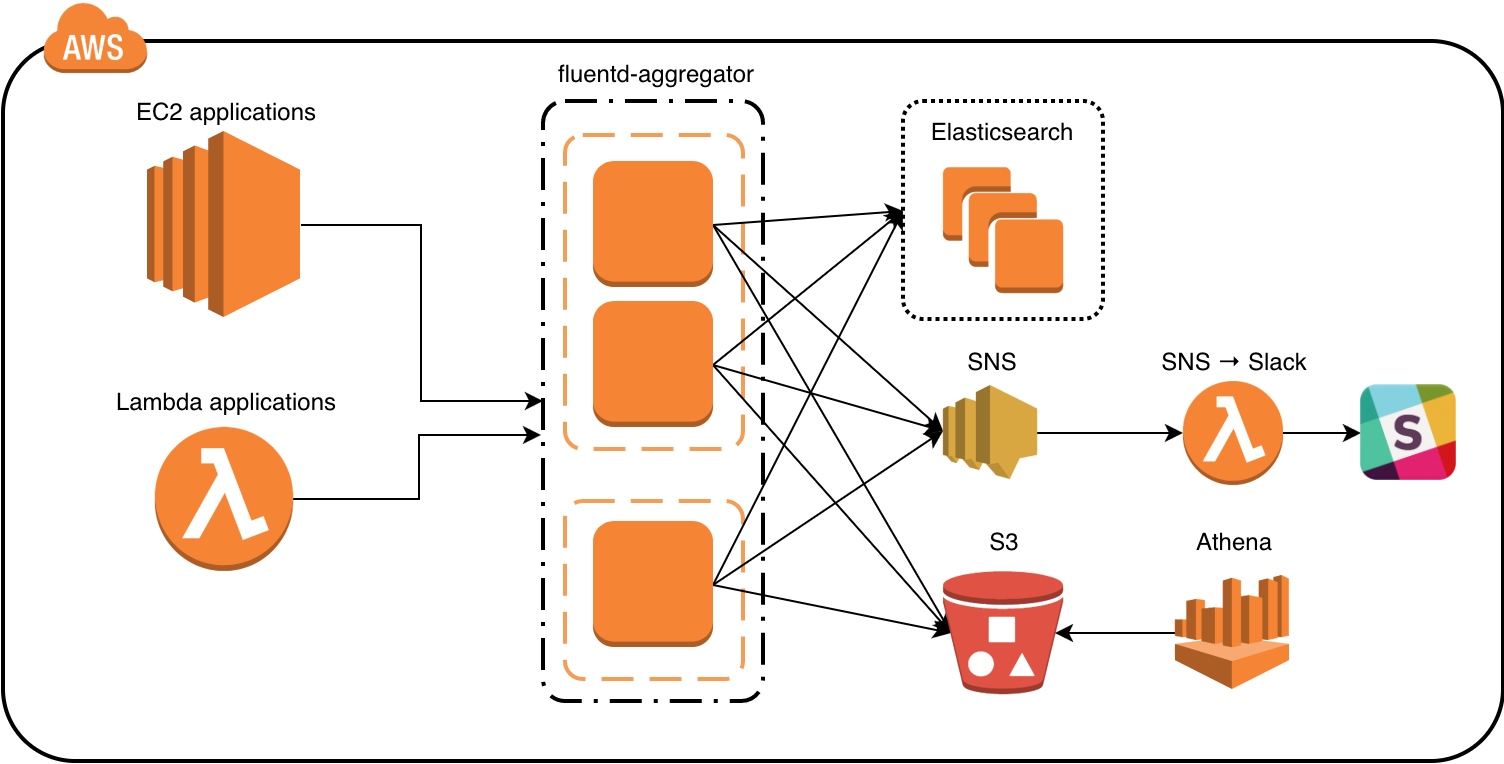
The general flow of data is from the application, to the fluentd aggregators, then to the backends – mainly Elasticsearch and S3. If a log event warrants a notification, it’s published to a SNS topic, which in turn triggers a Lambda function that sends the notification to Slack.